This week I followed two different tutorials on Youtube. I was working on these separately to my game. The first tutorial showed me how to make an in-game mini-map. The second tutorial I followed showed me how to add music and sound effects. It was a good idea trying out some new tutorials because I now feel inspired to use these in my own game.
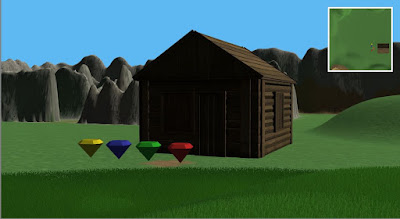
It was really easy to make a minimap. I had to make another camera and rotated it 90 degrees so it faced down on my game map. I then changed the perspective to orthographic. This gave the map a flat look. I then made a raw image using the UI tab, which made a rendered texture. I placed the rendered texture on the raw image. After that, I anchored the mini-map to the top right corner of the screen.
The second tutorial was also very easy to follow, I didn't have any problems and was able to get background music working for my game. All you have to do is add an audio source component and write a small bit of script. The final step is to drag the AudioObject and sound onto the script.
It was really easy to make a minimap. I had to make another camera and rotated it 90 degrees so it faced down on my game map. I then changed the perspective to orthographic. This gave the map a flat look. I then made a raw image using the UI tab, which made a rendered texture. I placed the rendered texture on the raw image. After that, I anchored the mini-map to the top right corner of the screen.

The minimap I made using the tutorial by Brackeys
The second tutorial was also very easy to follow, I didn't have any problems and was able to get background music working for my game. All you have to do is add an audio source component and write a small bit of script. The final step is to drag the AudioObject and sound onto the script.
Minimap tutorial By Brackeys
Music & Sound Effects Tutorial by Bowl and Cereal
Comments
Post a Comment